
Implement Long-term memory for Large Language models
Add personalised context to the LLM using FastEmbed and Qdrant via Mem0 and monitor the application using Opik

Problem Statement: Large Language Models (LLMs) are brilliant conversationalists until they forget everything you told them 5 minutes ago. This isn’t a flaw in reasoning; it’s a memory flaw. Without persistent memory, even the better LLMs remain stateless tools, resetting with every new session.

In this article, we will implement long-term memory using Mem0, Qdrant, and Gemini.
Need for Memory in LLM-Based Applications
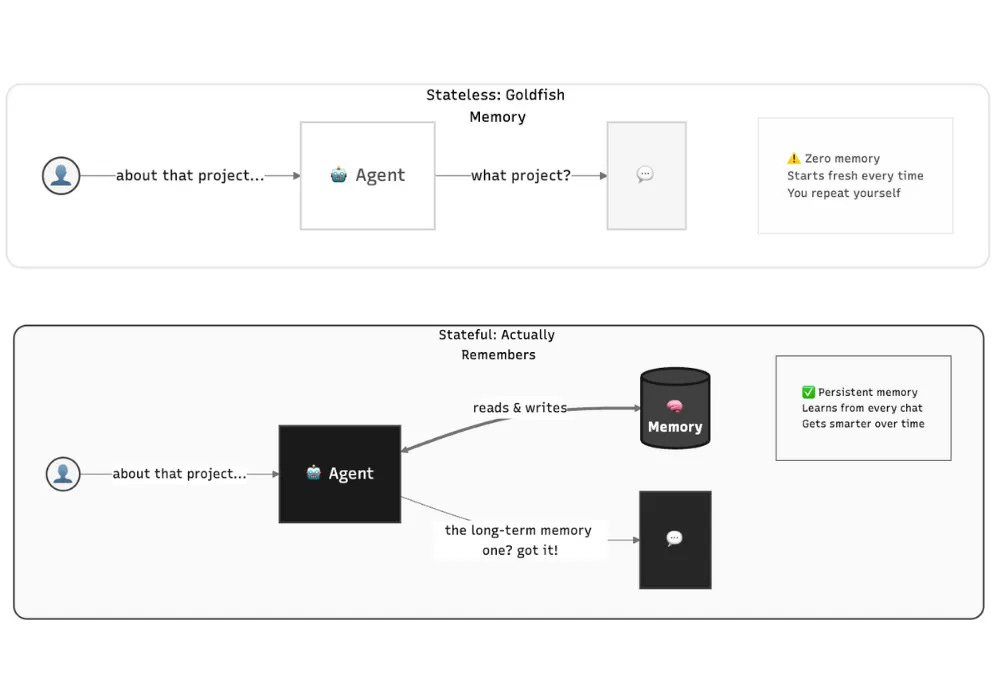
LLMs have no native memory. Their “awareness” is limited to what fits in the context window, and once that window scrolls, everything vanishes. This works for one-off tasks but fails catastrophically in real-world use:
You set your AI travel bot to “only book window seats.” It books you a middle seater — again
You tell your AI grocery list app you’re allergic to nuts. Next week, it suggests almond milk.
A personal planner suggests a morning meeting, even though you’ve said repeatedly you don’t work before 10 a.m.
These aren’t bugs, they’re symptoms of statelessness.
Memory persistence solves this. It gives applications the ability to remember what happened earlier and apply that learning later. Instead of treating each session as new, the system carries forward context, decisions, and preferences.
As discussed in the Mem0 paper, agents with long-term memory reduce hallucinations, improve personalization, and maintain coherence over weeks or months of dialogue, something even 128K+ context windows can’t guarantee when irrelevant chatter buries key facts.
Why Preference Matters for Personalized Responses
Every meaningful interaction is built on preference. The way someone likes information presented, the tone they respond to, and the choices they repeatedly make all form part of a behavioral pattern. When Agents remember those patterns, their behavior changes.
Mem0 handles this well. It tags memories with contextual weight, stores what’s important, and filters out the rest. This keeps memory structured and relevant, much like how humans subconsciously prioritize what to retain. Over time, these preferences form a knowledge layer that defines how the Agent responds, learns, and adapts.
Alright now that we have connected multiple dots to understand our problem statement, it is also critical to monitor the performance to understand what is saved inside the Memory and what is retrieved. This is where having a tool for observability is also very critical, this is where OPIK comes in.
Opik Assist: Track and Debug What Was Saved in Memory and Message Interactions
Once you start storing and retrieving information from memory and passing it to the LLM, observability becomes crucial. You need visibility into what was saved, how it evolved, and what was used as context in the conversation.
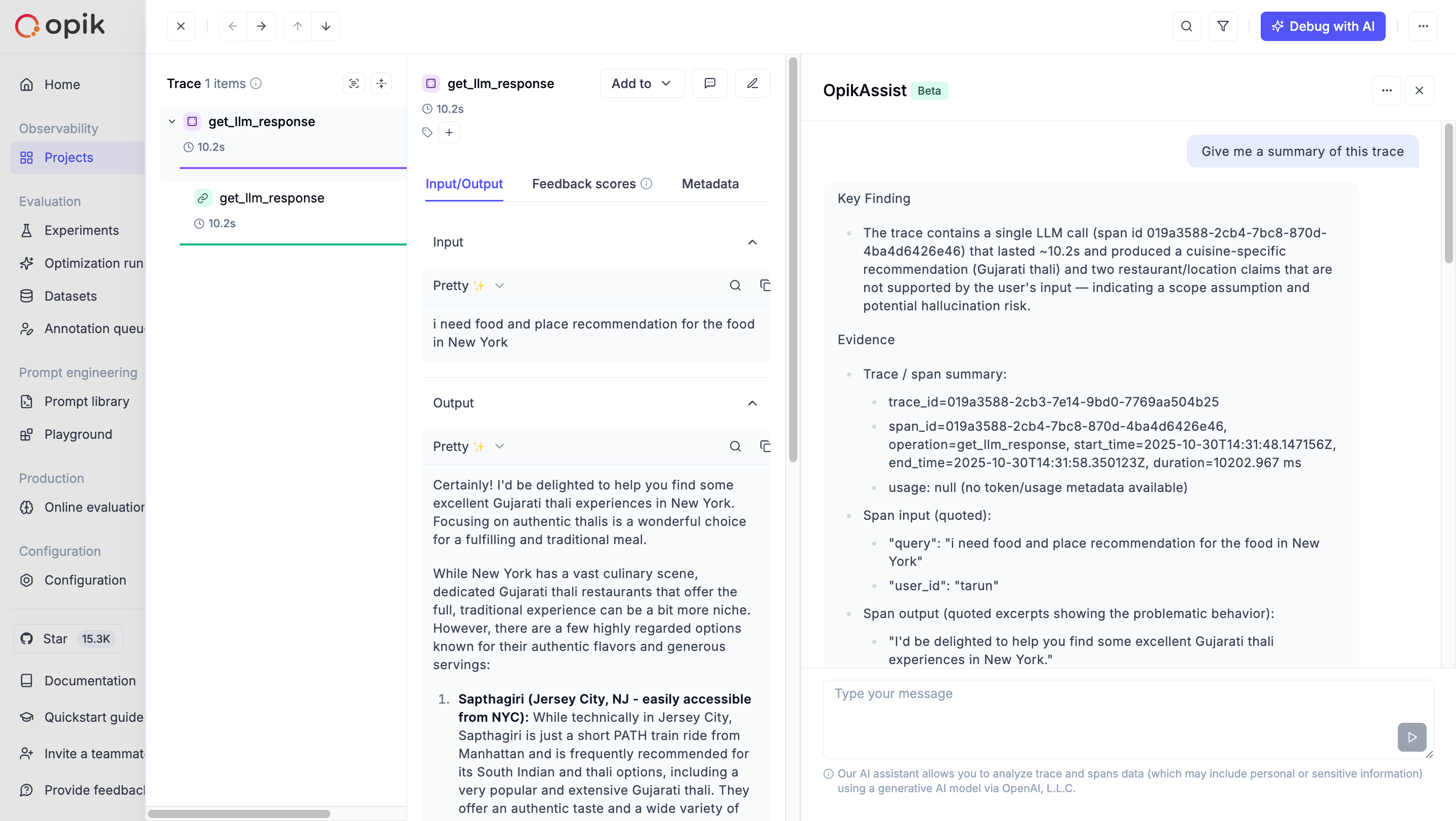
Opik Assist is an AI-powered assistant that helps you analyze, debug, and optimize your LLM application traces through natural conversation. You can ask questions in plain language about your current trace and its spans, making complex trace data easy to understand.
It automatically spots performance issues, detects bottlenecks, and provides clear debugging recommendations for failed or slow operations. Opik Assist also reveals underlying patterns and helps you evaluate the cost impact of your LLM calls, turning trace analysis into an effortless, insightful experience.
Docs to understand what data is shared to the Assist and Data Privacy: https://www.comet.com/docs/opik/tracing/opik_assist
IT’S TIME TO COOK.

Step-by-Step Implementation
In this use case, we will try to develop a personal Executive Assistant who remembers your preferences, be it food, travel choice, health details, or anything around it.
To set up the tracing and monitoring dashboard, you’ll need to define three environment variables: Opik Project, Workspace Name, and API Key. These credentials enable Opik Assist to connect and log your trace data seamlessly.
You can get your credentials from the Opik Dashboard and add them to your environment before running your application.
pip install opikGemini API Credentials
To use Gemini as the LLM, you need to fetch your API from Google AI Studio.
pip install google-genaiQdrant and FastEmbed
Now, coming to the Mem0, by default, it uses OpenAI as the embedding model and LLM model. In our case, we will be using Gemini LLM and FastEmbed embeddings [I was the contributor of this, haha].
For the Vector store, we will use Qdrant to assign the embedding dimensions for the embedding model used in FastEmbed.
Get your URL and Key by creating a free cluster on Qdrant Cloud.
pip install qdrant-client fastembedMem0
Either you define OpenAI config with Mem0 config, or if not, you can directly define Mem0 Client that needs Mem0 API key. We will go with a custom configuration.
pip install mem0ai
or
git clone https://github.com/mem0ai/mem0.git
pip install -e .
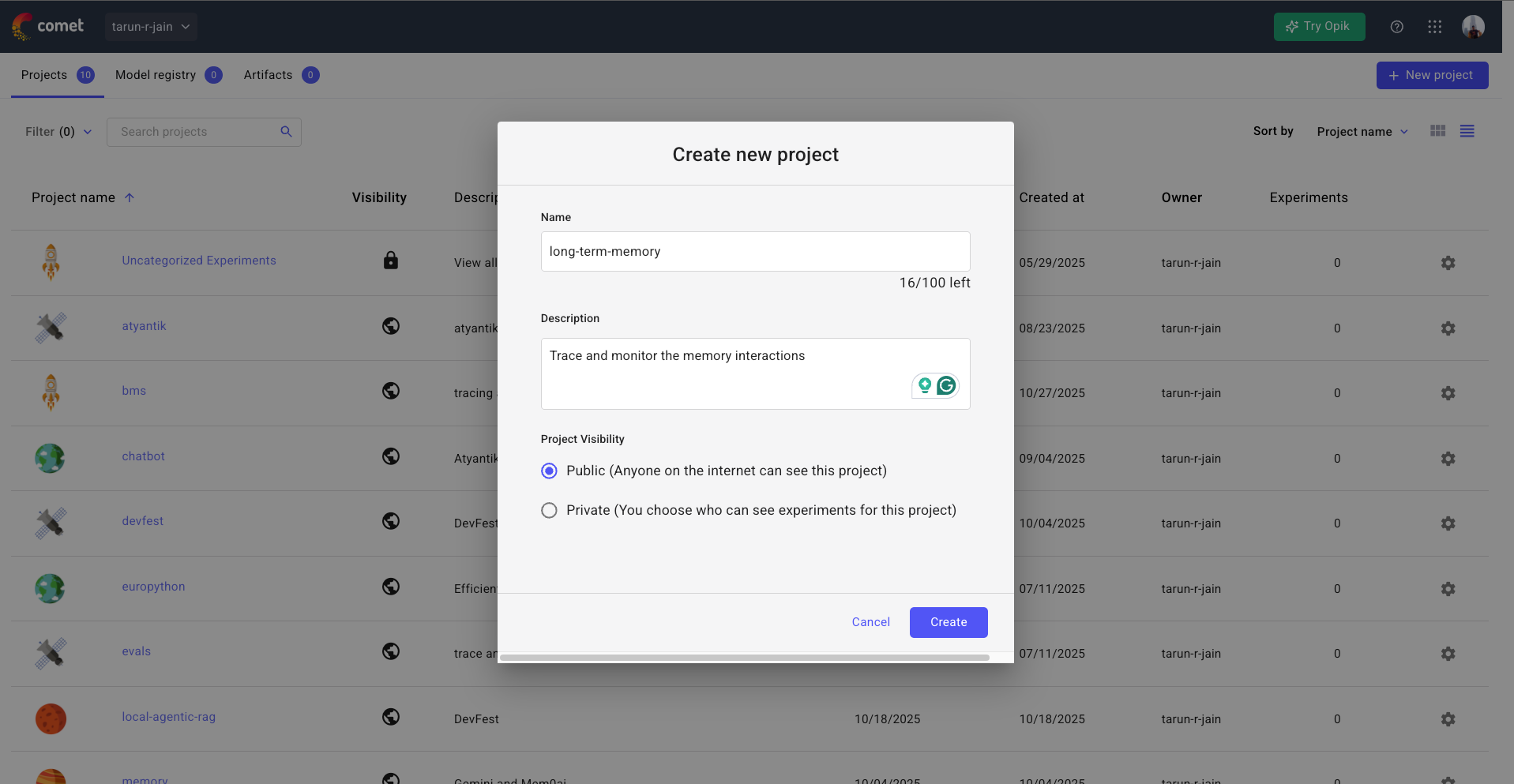
Alright, we’re done with the initial setup. Now it’s time to save the credentials in the environment variables. Once you sign up for OPIK, make sure to create a new project and keep it public.
import os

from opik import track, opik_context
from mem0 import Memory
from google.genai import Client

os.environ["GOOGLE_API_KEY"] = "<replace-with-your-key>"
os.environ["OPIK_API_KEY"] = "<replace-with-your-key>"
os.environ["OPIK_WORKSPACE"] = "tarun-r-jain"
# check top-left for the workspace name
os.environ["OPIK_PROJECT_NAME"] = "long-term-memory"
Custom Configuration
Here we define our LLM, vector store, and embedder in one unified config. This lets the Memory client choose the custom configuration instead of the default LLM and Embedding, i.e., OpenAI.
Make sure to replace the Qdrant Client URL and API Key accordingly.
config = {
    "llm": {
        "provider": "gemini",
        "config": {
            "model": "gemini-2.5-flash-lite",
        }
    },
    "vector_store": {
        "provider": "qdrant",
        "config": {
            "collection_name": "travel",
            "url": "https://*****:6333",
            "api_key”: "******",
            "embedding_model_dims": 768,
        }
    },
    "embedder": {
        "provider": "fastembed",
        "config": {
            "model": "jinaai/jina-embeddings-v2-base-en"
        }
    }
}

client = Memory.from_config(config)
Add preference to the Memory
Every user interaction carries a trace of preference, what they said, how they said it, and why it matters. The decorator track automatically logs and traces every call to the OPIK dashboard. To make the trace much better for OPIK assist to get more context, we also add opik_context with additional metadata.
@track
def add_memory(messages, user_id, metadata):
    result = client.add(messages, user_id=user_id, metadata=metadata)

    opik_context.update_current_trace(
        metadata = metadata
    )

    return result
This helps track when a memory was added, what data was stored, and the context around it. Here, make sure to have a unique user_id for the preference; here, I have defined it as my own name.
If you need better filtering during search, you can have metadata for each add operation you trigger.
initial_messages = [
    {"role": "user", "content": "What is the must try food in Baroda"},
    {"role": "assistant", "content": "Sev Usal is must"},
    {"role": "user", "content": "I'm not into street food, I prefer Gujarati thalis."},
    {"role": "assistant", "content": "Head to Mandap in Baroda, it's famous for authentic Gujarati thalis."},
]

add_memory(initial_messages, "tarun", {"category": "food"})
Now, if you test this code by running it, you will find the OPIK TRACE URL in the response terminal that will log your traces. Or you can directly open the project in the OPIK dashboard.
Retrieve relevant preference
To fetch the relevant context from memory, we just have to use the search function along with the user_id used to save the interactions.
def search_memory(query, user_id):
    result = client.search(query, user_id=user_id)
    return result
Generate LLM response
So far, we only have Context, now it’s time to pass this context to the Large language model. To make this better and personalized, have a solid SYSTEM PROMPT that can adapt to the role play of an Expert Executive Assistant.
SYSTEM_PROMPT = """
    You are an expert executive assistant who thinks carefully before responding,
    adapting to the poliet communication style based on the previous user’s established PREFERENCES and the complexity of their query.

    Maintain a polished, professional tone that is warm yet efficient—concise for
    simple questions, moderate for complex topics, and comprehensive for open-ended discussions.

    Act as a trusted advisor who doesn't just answer questions but adds value through insights, anticipates needs,
    and prioritizes what matters most while respecting the user's time with clear, actionable responses.
"""
Now, all the interactions you saved, like your previous food preferences, will come into play. Next time you travel to a new place, say New York, and ask for restaurant suggestions, it will prioritize your preferences instead of giving generic recommendations.
We will also trace this part, as it’s using the LLM operation.
@track
def get_llm_response(query: str, user_id: str) -> str:
    llm_client = Client()
    memories = search_memory(query,user_id=user_id)

    opik_context.update_current_trace(
        metadata = memories
    )

    mem_results = memories["results"]
    context = "\n".join(f"{m['memory']}" for m in mem_results)

    USER_PROMPT = f"""
      <question>
      QUESTION: {query}
      </question>

      <PREFERENCE>
      Preference: {context}
      </PREFERENCE>
    """

    response = llm_client.models.generate_content(
        model="gemini-2.5-pro",
        contents=USER_PROMPT,
        config={
            "system_instruction": SYSTEM_PROMPT
            }
    )
    return response.text


user_query = "i need food and place recommendation for the food in New York"
print(get_llm_response(user_query, "tarun"))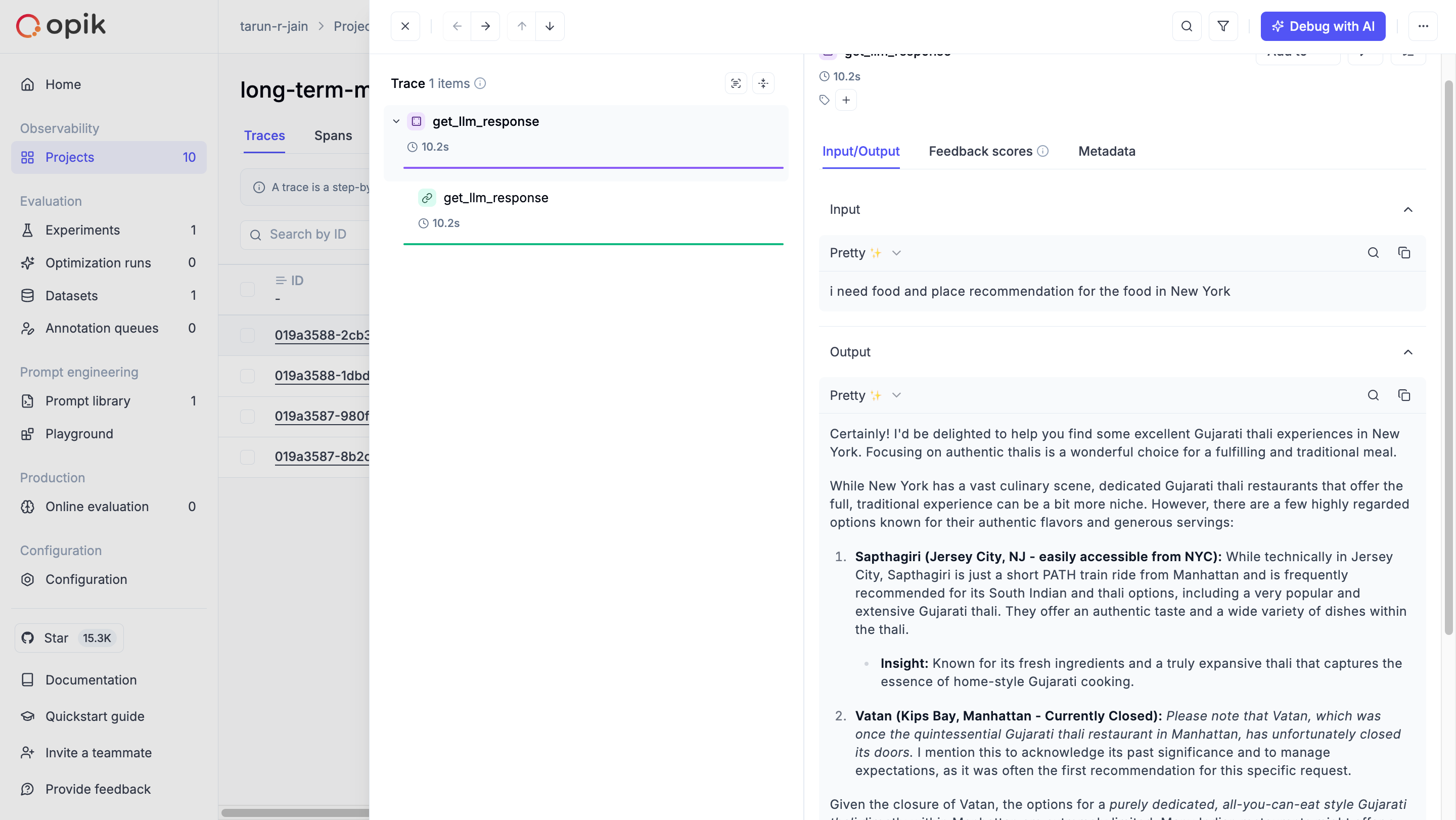
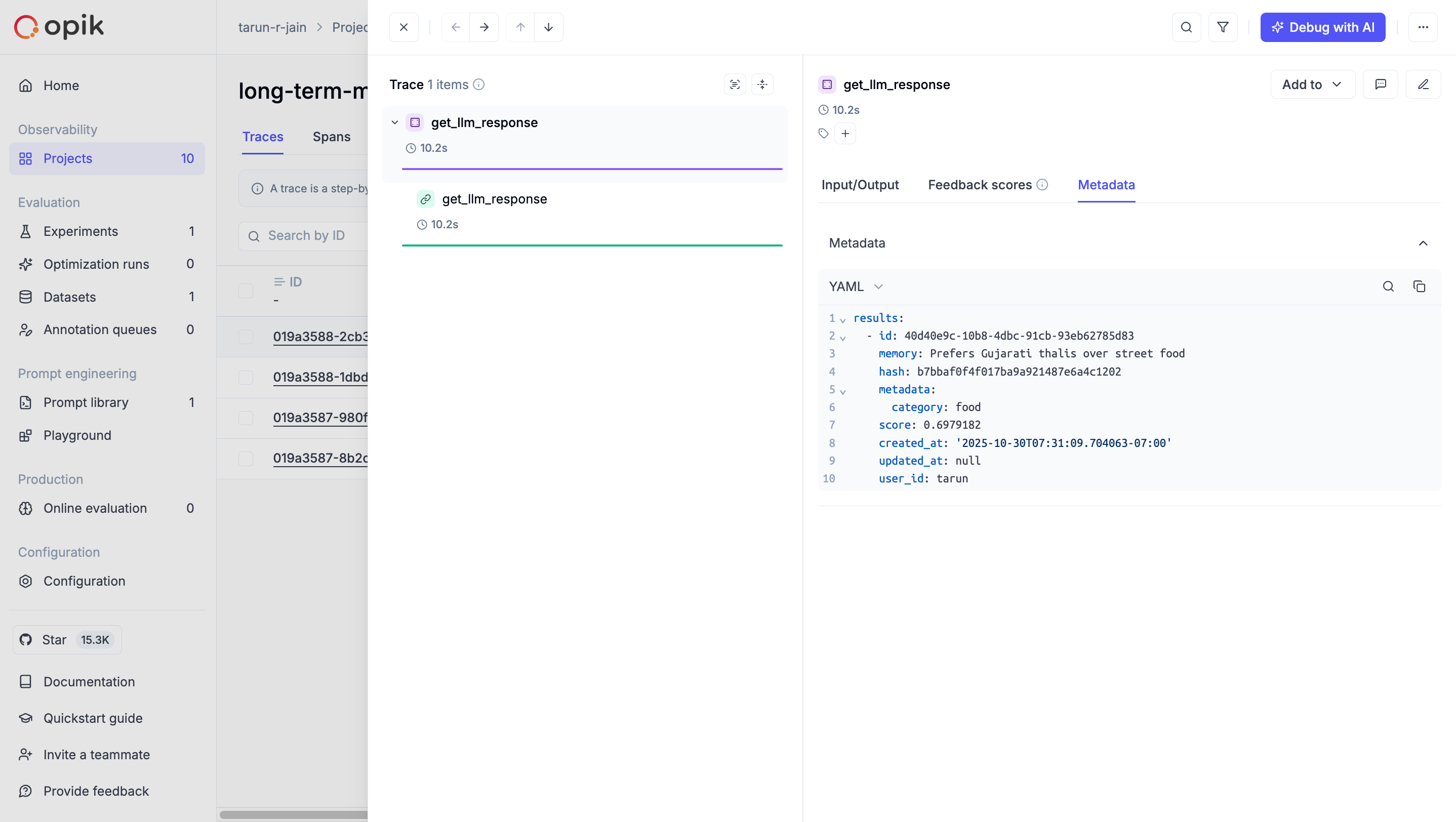
Debug and ask questions regarding your traces usign OPIK assist (once you have asked enough questions asked my user):
Conclusion
HURRAY!! That’s it with this article. As you saw, based on your previous preference, you have a personalised response rather than a generic response. This setup ensures that your Agent evolves with every interaction, learning what matters most to you.
DON’T FORGET TO LIKE THIS ARTICLE. SUBSCRIBE FOR MORE AI CONTENT.
This article comes at the perfect time. How far can Mem0 realy take us? Such brilliant insights!